Download reiwrite
Speak once. Write everywhere. Works in any app.
Up and running in 60 seconds
Download the installer
Click the button above and save the .exe file.
Run reiwrite Setup
Double-click the installer. It takes about 10 seconds.
Sign in or register
Create a free account — 200 credits included on signup.
Press Ctrl+Shift+D
Speak anywhere. reiwrite types the result at your cursor.
Windows or your browser may show a security warning — this is normal
Because reiwrite is a new app without a paid code-signing certificate yet, Windows SmartScreen and browsers like Firefox flag it as "unrecognized." The app is safe — here's exactly what you'll see, and how to install it anyway:
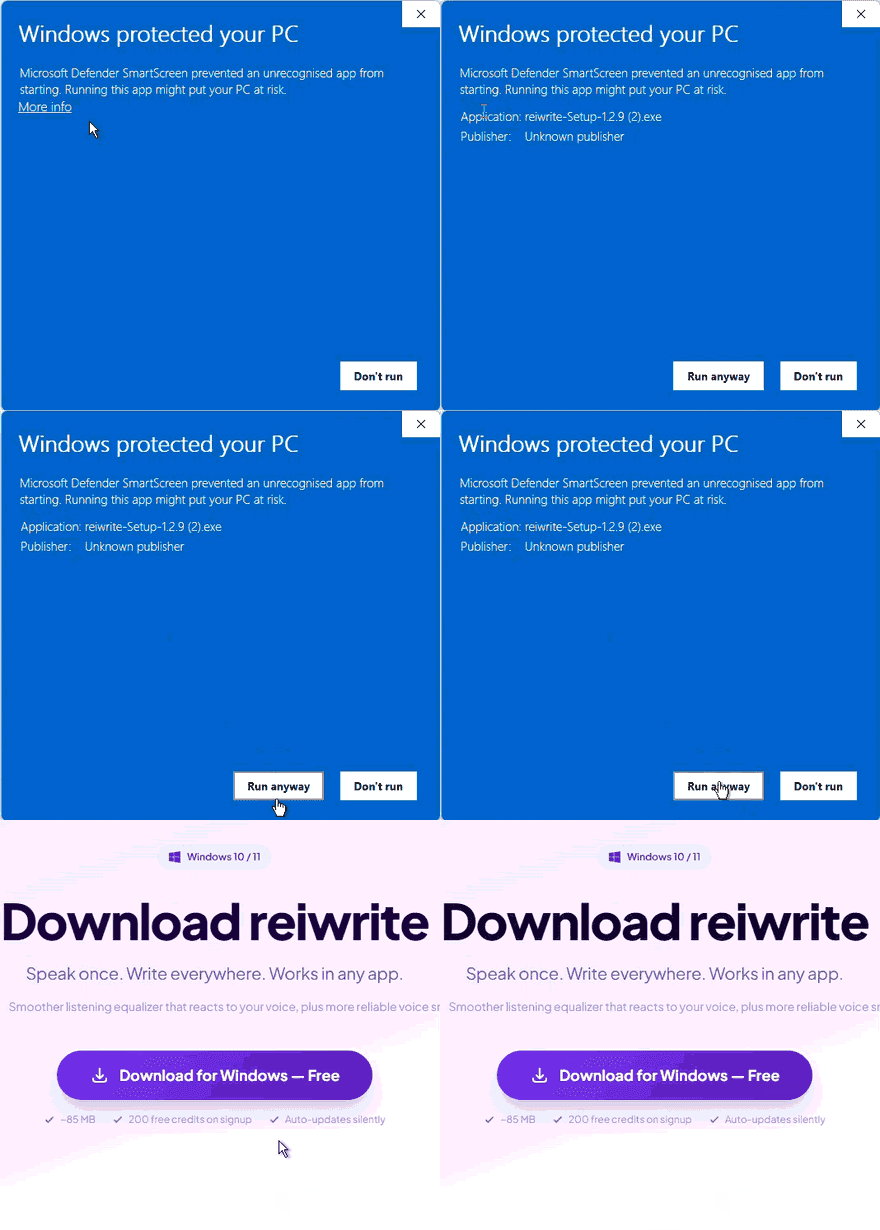
Windows SmartScreen popup
- 1. Click "More info" on the blue warning screen
- 2. Click "Run anyway" that appears below
- 3. Installation proceeds normally
Firefox "suspicious file" warning
- 1. Click the download arrow in the toolbar
- 2. Click "Keep" or "Allow download"
- 3. Open the saved file to install
We're working on getting a code-signing certificate to eliminate this warning in future releases.
Always up to date — automatically
reiwrite checks for updates silently in the background. When a new version is ready, it downloads automatically and installs the next time you close the app. You never need to download the installer again.
System requirements
Already have an account?